
Cursor vs Claude Code: Advantages, Limitations and Use Cases
- Shreyas Karanjkar

- Apr 2
- 8 min read
AI coding tools have gone way beyond autocomplete. Both Cursor and Claude Code have evolved into full agentic coding platforms, and their feature sets now overlap more than most comparison articles admit.
But they are built on fundamentally different philosophies. Cursor is an AI native IDE rebuilt around agents. Claude Code is an autonomous coding agent that lives in your terminal and integrates into your existing workflow. That distinction shapes everything: how you write code, how you review changes, how much autonomy you hand off, and what you pay.
Here we’ll explore the strengths and weaknesses of both platforms and discover which one is ideal for you; especially if you are operating in AI/ML, software development and product engineering space. Let’s dive right in.
Cursor vs Claude Code at a Glance
Feature | Cursor | Claude Code |
Interface | AI native IDE (VS Code fork) | Terminal first + VS Code extension, desktop, browser |
Primary workflow | Visual editing, inline diffs, multi agent parallel execution | Command driven, Plan Mode, checkpoint based rollback |
Context window | Model dependent. Up to 1M tokens in Max Mode (20% upcharge) | Native 1M tokens on Opus 4.6 and Sonnet 4.6 at standard pricing |
Agentic capabilities | Composer 2, Cloud Agents, Automations, multi agent worktrees | Sub agents, agent teams, Agent SDK, hooks, skills |
Model flexibility | Multi model: Composer 2, Claude 4.6, GPT 5.2, Gemini 3 Pro, Grok Code | Anthropic models only: Sonnet 4.6, Opus 4.6, Haiku 4.5 |
Pricing model | Subscription + credit pool (from $20/mo) | Subscription (from $20/mo) or API pay per token |
Best fit | Teams wanting everything in one visual IDE | Terminal native engineers wanting deep autonomy and programmability |
Cursor vs Claude Code: Core Capabilities Compared
Developer Interface and Workflow Fit
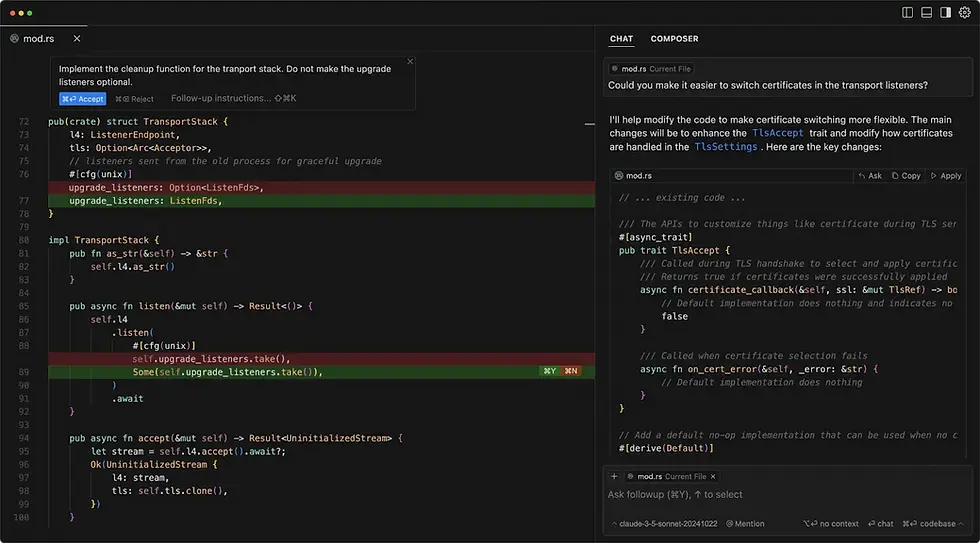
Cursor gives you the familiar VS Code environment rebuilt around AI. You get inline diffs, side-by-side code review, multi-file editing, and a native browser for testing agent output. Everything lives in one place: editing, chat, agents, cloud execution, and PR review. For teams that want a single product surface, Cursor keeps context switching low.
Claude Code takes the opposite approach. It runs in your terminal first, with a VS Code extension and desktop app as secondary interfaces. Plan Mode lets you review the agent's strategy before it touches any files. Checkpoints create a snapshot on every edit, so you can roll back instantly if something goes wrong. If you live in the shell, this feels natural.

Practical takeaway: Frontend heavy teams and product designers tend to adopt Cursor faster. Backend, platform, and infrastructure engineers usually lean toward Claude Code.
Agentic Features and Autonomy
This is where the two tools diverge significantly.
Cursor now ships with Composer 2, a proprietary frontier coding model trained specifically for agentic tasks. It delivers what Cursor calls frontier level coding at $0.50 per million input tokens and $2.50 per million output tokens. On top of that, Cloud Agents run asynchronous tasks in sandboxed environments, and Automations let you trigger agents from Slack, GitHub, PagerDuty, or webhooks. You can run up to eight agents in parallel on a single prompt, each operating in its own isolated worktree.
Claude Code approaches autonomy differently. Instead of parallel agents exploring different strategies, it uses sub agents within a single shared reasoning process.
All sub agents share the same plan, context, and workspace. Agent teams (currently in research preview on Max plans) coordinate multi agent work. The Agent SDK lets you embed coding agent capabilities into internal engineering systems, and hooks provide deterministic automation triggers for validation, testing, and workflow enforcement.
Key distinction: Cursor's agents work like parallel developers exploring different approaches. Claude Code's sub agents coordinate within one deeply reasoned plan. Choose based on whether you need breadth of exploration or depth of reasoning.
Context Windows and Codebase Handling
Cursor:
Cursor's effective context depends on which model you select. Auto mode routes to cost efficient models automatically. Max Mode extends context to whatever the underlying model supports (up to 1M tokens when using Claude models), but adds a 20% upcharge on individual plans.
Cursor also builds a project graph in the background for semantic search and codebase comprehension, which helps even when the raw context window is smaller.
Claude Code:
Claude Code offers a native 1M token context window on Opus 4.6 and Sonnet 4.6 at standard pricing, with no upcharge for extended context. For large AI/ML codebases with deep dependency graphs, this can be a meaningful cost advantage.
The practical question is not just raw context size, though. It is cost adjusted usable context for real repository tasks. According to usage data cited by multiple third party sources, the average Claude Code developer spends roughly $6 per day on token consumption.
Heavy users on the Max plan ($100 to $200/mo) often find the subscription dramatically cheaper than equivalent API spend.
Model Flexibility
Cursor routes across multiple model providers: Composer 2, Claude 4.6 Opus and Sonnet, GPT 5.2, Gemini 3 Pro, and Grok Code. Auto mode selects the most cost efficient model per task. You can manually select premium models from your credit pool when a task demands it.
Claude Code is optimized exclusively for Anthropic's own models. You get Sonnet 4.6, Opus 4.6, and Haiku 4.5 (as of March 2026). The deep integration means better instruction following and stronger reasoning on complex tasks, but there is no option to swap in GPT or Gemini.
Takeaway: Cursor wins on model flexibility. Claude Code wins on model depth and optimization within the Anthropic ecosystem.
Cursor vs Claude Code: Pricing in 2026
Direct price comparison is trickier than it was a year ago. In June 2025, Cursor overhauled its billing from fixed request allotments to usage-based credit pools. Claude Code runs on a separate subscription vs. API billing distinction. Here is how each breaks down.
Cursor Pricing
Hobby (free): Limited agent requests and tab completions. Good for evaluation, not daily use.
Pro ($20/mo): Unlimited tab completions, $20 credit pool for premium models. Auto mode usage is unlimited.
Pro+ ($60/mo): Same features, $60 credit pool. Recommended by Cursor for power users.
Ultra ($200/mo): Highest credit pool for heavy agent usage.
Teams ($40/user/mo): Adds collaboration, privacy controls, admin governance, and SSO.
Enterprise: Custom pricing with RBAC, audit logs, CMEK, and pooled org usage.
Important: Max Mode adds a 20% upcharge. Cloud Agents are billed at model API pricing. Bugbot (PR review) is priced separately.
Claude Code Pricing
Pro ($20/mo, $17/mo annual): Includes Claude Code access via terminal and VS Code. 5x free tier usage limits.
Max ($100/mo): 5x Pro usage, Opus 4.6 access, agent teams (research preview).
Max ($200/mo): 20x Pro usage, maximum priority access.
Team Standard ($25/user/mo): Core collaboration. Minimum 5 members.
Team Premium ($150/user/mo): Adds Claude Code and Cowork access.
API pay per token rates: Opus 4.6 at $5 input / $25 output per million tokens. Sonnet 4.6 at $3 / $15. Haiku 4.5 at $1 / $5.
Our Verdict on Pricing
Neither tool is universally cheaper. For solo developers doing 2 to 4 hours per day, both Pro plans ($20/mo) are comparable starting points. Cursor's credit pool model is easier to grasp upfront but can surprise teams using premium models heavily. Claude Code's subscription vs. API distinction needs careful separation when budgeting.
For heavy users, the Max subscription often delivers dramatically better value. One developer tracked over $5,600 in equivalent API costs during a single heavy month versus $100 on the Max plan. If Claude Code is central to your workflow and you lean on Opus, the math strongly favors a subscription.
Pricing dimension | Cursor | Claude Code |
Entry point | Free tier (limited). Pro at $20/mo with $20 credit pool. Pro+ at $60/mo, Ultra at $200/mo. | Free tier (no Claude Code access). Pro at $20/mo ($17/mo annual). Max at $100/mo or $200/mo. |
Billing model | Subscription + usage based credit pool. Each plan includes credits equal to the plan price. Overages billed at model API rates. | Subscription with rate limits (Pro/Max) or API pay per token. Two separate billing paths, not one combined pool. |
What is unlimited | Tab completions and Auto mode on all paid plans. These do not consume credits. | Subscription usage within rate limits. Pro gets 5x free tier. Max $100 gets 5x Pro. Max $200 gets 20x Pro. |
What costs extra | Manually selecting premium models (Claude Sonnet, GPT 5.2, Opus) draws from credit pool. Max Mode adds 20% upcharge. Cloud Agents billed at model API pricing. Bugbot priced separately. | API pay per token: Opus 4.6 at $5/$25 per million tokens, Sonnet 4.6 at $3/$15, Haiku 4.5 at $1/$5. Subscription and API billing are separate. |
Team pricing | Teams at $40/user/mo with collaboration, SSO, privacy controls. Enterprise is custom with RBAC, audit logs, CMEK. | Team Standard at $25/user/mo (min 5 seats). Team Premium at $150/user/mo adds Claude Code and Cowork. Enterprise is custom. |
Advantages of Cursor vs Claude Code
Where Cursor Has the Edge
More intuitive for editor first development with visual diffs, inline review, and a native browser for testing
Multi model flexibility lets teams pick the best model per task, including Cursor's own Composer 2
Composer 2 offers frontier coding at competitive token pricing ($0.50/$2.50 per million tokens)
Automations and 30+ partner plugins (Atlassian, Datadog, GitLab, Hugging Face) create a connected development surface
Stronger onboarding for mixed technical teams where designers, PMs, and product engineers all contribute code
Where Claude Code Has the Edge
Superior long context reasoning and autonomous execution for complex refactors and architecture level work
Terminal native workflow with Plan Mode, granular permission controls, and checkpoint based safety
Agent SDK and sub agent model enable building repeatable internal AI engineering systems
Stronger for security conscious teams wanting AI assisted review earlier in the development lifecycle
Deep model optimization means better instruction following on Anthropic's own models, especially Opus 4.6
Limitations of Claude Code and Cursor
Cursor Limitations
Cost predictability erodes with Max Mode, premium model selection, and Cloud Agent usage layered on top of the subscription
Feature breadth (editor + agents + cloud + PR review + plugins) creates governance complexity for larger teams
Best experience is model dependent and plan tier dependent, not just about the editor itself
Claude Code Limitations
Terminal centric workflow can be a barrier for developers who want visual editing as their home base
Subscription vs. API billing distinction is easy to misunderstand, especially for teams budgeting across both paths
Higher autonomy requires setup maturity. Permissions, hooks, and automation configs need intentional design to get right
When to Choose Cursor, Claude Code, or Both
Choose Cursor When
Your team ships UI heavy features and values visual feedback loops in a familiar IDE environment
You want multi model flexibility and a single product surface for editing, review, and async cloud work
You are adopting AI coding tools without building internal agent infrastructure
Choose Claude Code When
Your workflow is terminal heavy and involves large scale codebase analysis, migrations, or complex AI/ML system work
You need programmable agent behavior and want to embed coding agents into internal engineering systems via the Agent SDK
Security review and governance first workflows are a priority
Use Both When
This is increasingly the enterprise pattern. Editor first developers use Cursor for daily iteration, while platform and automation teams use Claude Code for orchestration and deep reasoning. You can even run Claude Code inside a terminal within Cursor and review its changes through Cursor's diff interface.
The key insight is that tool choice should follow system design and governance requirements, not brand preference or habit.
Choosing the Right Tool for Your AI Product Engineering Workflow
Before committing to either tool, ask your team these questions:
Where does your team actually work? If the answer is IDE, lean Cursor. If terminal, lean Claude Code.
What is your task scale? Daily feature iteration favors Cursor. Large scale refactors and codebase migrations favor Claude Code.
How important is model flexibility vs. model depth? Multi model routing favors Cursor. Deep Anthropic optimization favors Claude Code.
What is your budget tolerance for usage variability? Credit pool billing (Cursor) vs. flat subscription (Claude Code Max) require different budgeting approaches.
Do you need programmable agent behavior? Claude Code's Agent SDK and hooks offer more low level control than Cursor's productized extensibility.
But here is the bigger point. The tool itself is only part of the equation. Most teams underperform not because they picked the wrong coding assistant, but because they lack the workflow design, evaluation criteria, guardrails, and integration architecture around it.
Reliable AI product engineering requires more than choosing between Cursor and Claude Code. It requires designing the system that makes either tool (or both) deliver consistent, production ready results.
Ready to move beyond tool selection? Partner with Axia to design and build enterprise AI solutions using generative AI augmented product engineering. The right platform matters, but the real advantage comes from how you architect the workflow, guardrails, and delivery system around it.

Comments